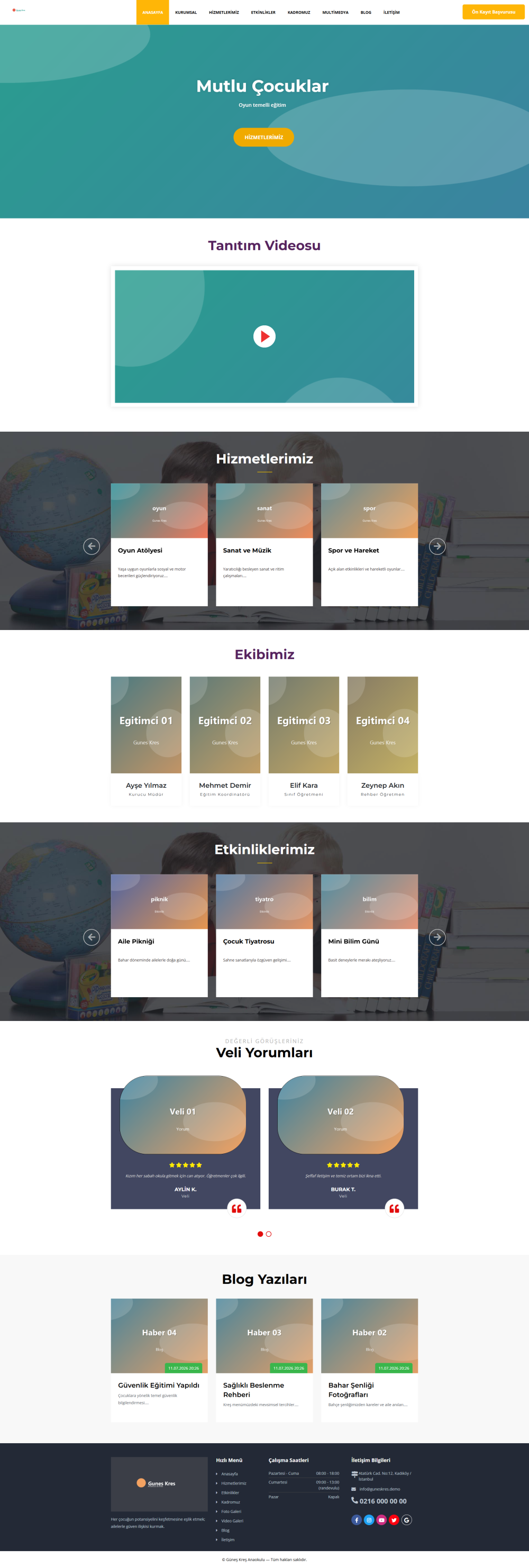
TiklaWeb Kindergarten & Preschool Script is a modern, secure and professional website management solution developed specifically for kindergartens, preschools, daycare centers and early childhood education institutions.
With its modern design, powerful administration panel and advanced content management system, you can easily manage your entire website without requiring any technical knowledge, update your content and professionally promote your institution.
Main Features
- Modern and fully responsive design
- SEO-friendly URL structure and meta management
- Advanced Administration Panel
- One-click Installation Wizard
- Secure installation with license key verification
- One-click software updates from the administration panel
- Automatic backup and restore system
- System Health Check
- Blog & News Management
- Photo & Video Gallery
- Event Management
- Teacher Management
- Parent Testimonials
- Services Management
- About Us Page
- Contact Page
- Online Pre-Registration Form
- SMTP Email Management
- Demo or Clean Installation options
- Showcase sample content and media
- Recommended image size guidelines for media uploads
- Secure update management from the admin panel
- Rollback support
- Advanced license verification system
- High-level security infrastructure
Advantages
- Installation in less than 5 minutes
- User-friendly administration panel
- Fully compatible with mobile, tablet and desktop devices
- SEO-optimized architecture
- Easy content management
- Regular software updates
- Secure licensing system
- Backup and restore support
- Future-ready architecture for upcoming updates
- Professional software infrastructure built according to TiklaWeb standards
Installation Instructions
The TiklaWeb Kindergarten & Preschool Script can be installed within a few minutes using the built-in Installation Wizard. No manual code modifications are required.
Installation Steps
- Upload all files from the upload folder to your hosting account.
- Open your website in a browser to launch the Installation Wizard.
- Enter your license key and complete the verification process.
- Provide your database connection information.
- Create your administrator account.
- Complete the installation and log in to the administration panel.
Installation Options
- Demo Installation: Installs the system with showcase content and sample images.
- Clean Installation: Installs an empty system ready for your own content.
After Installation
- Configure your website settings.
- Upload your logo and favicon.
- Edit the demo content or create your own content.
- Configure your SMTP email settings.
- Run the System Health Check to verify your server configuration.
- Install future software updates securely through the administration panel.
Note: During installation, the wizard automatically checks the required PHP version, server components and directory permissions before continuing.
Update Version History
V1.3.5 (July 11, 2026)
- Required update directories are now created automatically during installation.
- Added write permission checks on the Update page; users are warned before uploading if any required directory is not writable.
- System Health Check now verifies update-related directories.
- Error messages have been simplified to clearly indicate which directory is causing the issue.
V1.3.4 (July 11, 2026)
- Improved the working hours layout in the footer and contact page.
- Optimized the working hours display for better readability.
- Fixed the static English text issue.
- Applied minor user interface and usability improvements.
V1.3.3 (July 11, 2026)
- Enhanced the license verification system.
- Improved the security of the update infrastructure.
- Fixed the admin panel logo display issue.
- Applied various installation and frontend improvements.
V1.3.2 (July 11, 2026)
- Strengthened the installation process for improved stability.
- Enhanced invalid license key validation.
- Added automatic redirection after installation.
- Improved the contact page and homepage slider layout.
V1.3.1 (July 11, 2026)
- Added Demo and Clean Installation options.
- Introduced Showcase sample content and images.
- Added recommended image size guidelines for media uploads.
- Added update management through the administration panel.
V1.3.0 (July 11, 2026)
- Released the first TiklaWeb edition of the product.
- Introduced a brand-new installation wizard.
- Integrated an advanced license verification system.
- Completely redesigned the administration panel.
- Added automatic backup and restore functionality.
- Introduced the System Health Check feature.
- Built a secure software update infrastructure.
- Completely rebuilt the security architecture.
V1.2
- Applied various database improvements.
- Resolved reported bugs and stability issues.
V1.1
- Improved overall system performance.
- Enhanced SEO-friendly URL structure.
- Fixed URL redirection issues.
V1.0
- Improved the Blog and News modules.
- Optimized the .htaccess configuration.
- Applied initial database optimizations.
 Copyright © 2026 All Rights Reserved

 Turkey (Türkçe)
 Worldwide (English)